Inbound Tab
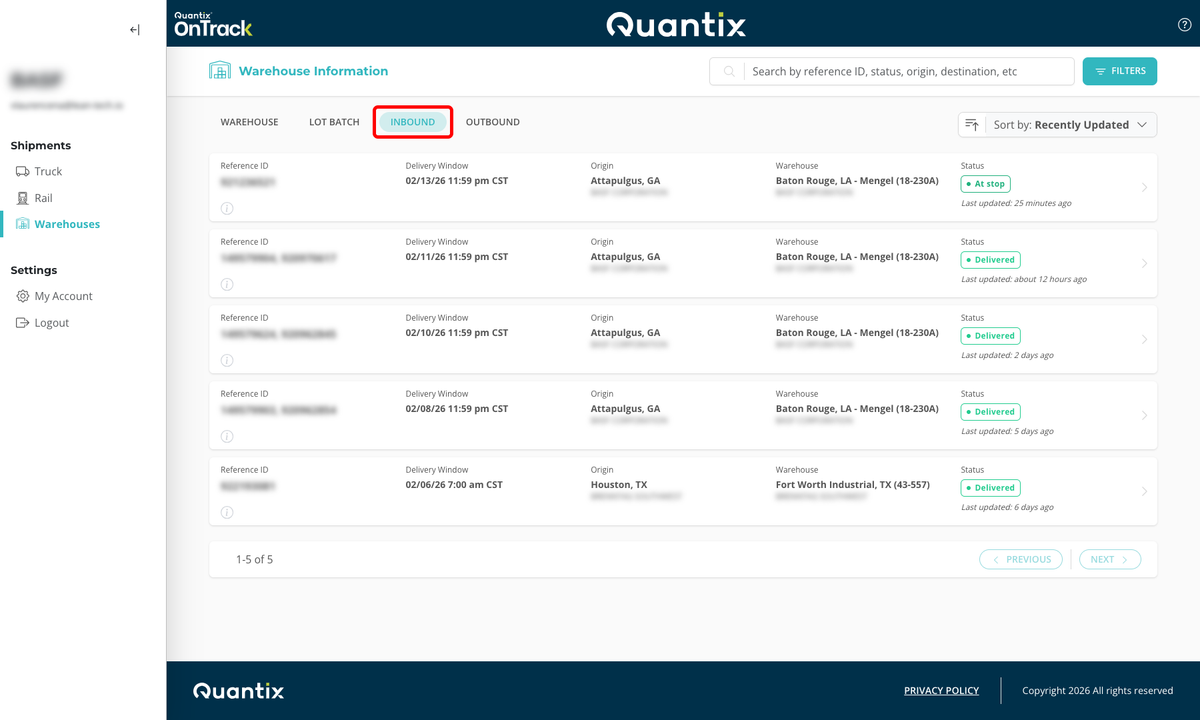
OnTrack allows you to see a list of your inbound shipments using the Inbound tab at the top of the Warehouses module main page.
Searching for an Inbound Order
In order to find individual inbound shipments, you can search for them by certain criteria. The most efficient is the Reference ID number, but you may also search by the origin or destination cities, as demonstrated below.
This is a useful feature that helps planners better find their incoming inventory.

Filtering Inbound Orders
If you need to find inbound shipments with varying criteria, OnTrack offers a filtering feature that you can use. The FILTERS button can be found in the upper right-hand corner of the Inbound tab screen.

This will open the filtering menu, where you can add as many criteria to the filter as you want in order to see just the results they want to see.
The available filtering criteria are:
- Timing: On time, at risk, and late.
- Status: Open, Dispatched, In-Transit, At-Stop, Delivered, and Cancelled.
- Date range: A custom date range or a specific date.
- Origin and destination: City or state, both for origin or destination.
- Company: Origin and/or destination company.
- Equipment: Liquid, Dry Bulk, Drayage, Dry Van, ISO Containers, and Intermodal.
To clear filters, just hit the CLEAR FILTERS button at the bottom of the filtering menu.
Sorting Inbound Orders
If you want to organize your data by specific criteria, you can use the Sort by drop-down list located right underneath the FILTERS button.
After clicking the drop-down button, you can select to sort by any of the following criteria:
- Recently Updated: Sorts by when the shipment last reported location data
- Status: Sorts by the shipment's current status
- Origin: Sorts by the loading location
- Delivery Window: Sorts by the shipment's delivery date and time
- Destination: Sorts by delivery location
Once you've selected the criteria you want to sort by, you can change to ascending or descending by clicking the icon to the left of the drop-down menu.

Inbound Card Details
Each inbound order has its own card that displays vital information about the shipment, such as:

- Reference ID (redacted for privacy).
- Current timing status.
- Consignee's delivery window.
- Origin city, state, and company.
- Destination city, state, and company.
- Current shipment status.
- Current shipment ETA.
- The last time the shipment information was updated.
Selecting any of these cards will take you directly to that shipment's details page in the Truck module.